Explore the hidden costs of load balancing in multi-AZ Kubernetes deployments, from increased latency to unexpected expenses.
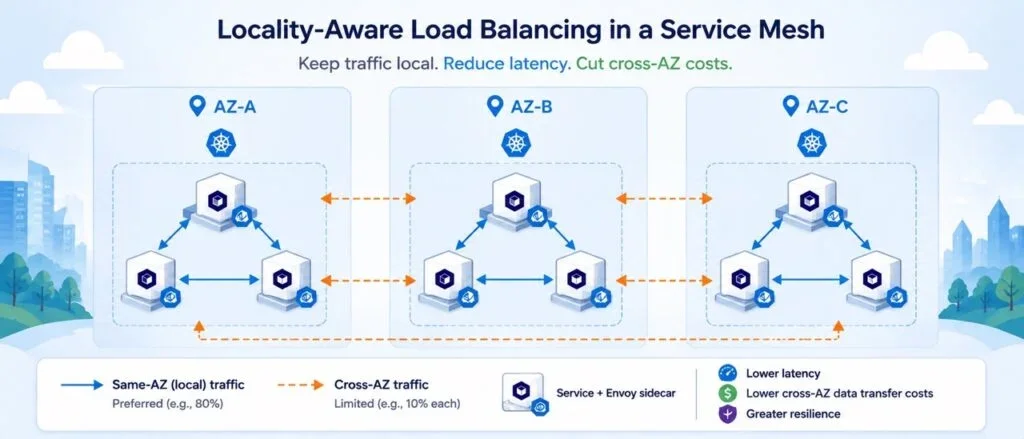
If you manage a multi-availability zone (AZ) Kubernetes cluster layered with a service mesh, you might be unwittingly incurring costs that aren't reflected in your existing monitoring dashboards. These are not merely fiscal matters; they can significantly affect your application's performance and resilience.
The Oversight of Default Configurations
Kubernetes Services paired with Istio's Envoy sidecars by default distribute traffic uniformly across all operational endpoints. While this strategy is viable in a single-AZ scenario, it presents challenges when your deployments span multiple AZs for enhanced fault tolerance. For instance, a pod located in us-east-1a risks routing requests to pods situated in various AZs, leading to potential latency issues and increased operational cost.
The consequence of this traffic randomness accumulates quickly. A request originating in one AZ could hop through several other zones involving multiple internal services and database replicas, inflating both response times and the associated network costs.
AWS contributes to this issue with its cross-zone load balancing features, which can lead to situations where healthy targets are overlooked in favor of those located in different AZs, even when they are physically closer and more efficient.
The Real Costs: Latency and Budget Impacts
Two main repercussions stem from these default configurations: increased latency and unexpected financial costs.
- Latency: In a typical production scenario with approximately 3,500 requests per second across three AZs, analysis reveals that same-AZ requests achieve response times of around 15–18ms p50. In contrast, cross-AZ requests can lag at 25–30ms p50—demonstrating a 40% to 65% increase in response times. When combined, this results in a weighted p50 latency of approximately 24ms, which is notably slower than the 17ms achievable with localized traffic.
- Costs: AWS charges $0.01 per GB for traffic that crosses AZ boundaries. Although this might appear negligible on a per-request basis, internal service communications typically generate significantly more traffic than external requests once you factor in API calls, database reads, and Kafka data flows. For a conservative analysis, a cluster's internal cross-AZ traffic can amount to roughly $600 monthly before accounting for other factors like Aurora's cross-AZ data replication—potentially leading to even higher totals depending on your specific traffic patterns.
Implementing Locality-Aware Load Balancing
Istio provides a mechanism for locality-aware load balancing through its DestinationRule. However, a simplistic approach of sending all traffic to the local AZ is not advisable. This could hinder the capacity to handle a problematic deployment in the local zone or complicate recovery in the event of a full AZ failure.
A more nuanced approach is to configure a weighted distribution, such as directing 80% of traffic to the local AZ and allocating the remaining 20% across other zones. Additionally, implementing outlier detection mechanisms ensures that unhealthy endpoints are automatically filtered out.
apiVersion: networking.istio.io/v1beta1
kind: DestinationRule
metadata:
  name: service-locality-lb
spec:
  host: service-name.prod.svc.cluster.local
  trafficPolicy:
    loadBalancer:
      localityLbSetting:
        enabled: true
        distribute:
          - from: us-east-1a/*
            to:
              "us-east-1a/*": 80
              "us-east-1b/*": 10
              "us-east-1c/*": 10
    outlierDetection:
      consecutiveErrors: 5
      interval: 30s
      baseEjectionTime: 30s
      maxEjectionPercent: 50
Necessary Conditions for Success
For locality-aware traffic management to be effective, consider these three essential points:
- Even Distribution of Pods: Pods must be distributed evenly across available AZs; otherwise, an unequal allocation results in biasing traffic toward the AZ hosting the majority of pods. Kubernetes’
topologySpreadConstraintscan help maintain this balance. - Inclusion of Ingress Pods Across AZs: Locality-aware routing will be ineffective if ingress gateway pods are concentrated in a single AZ. Ensure balanced placement across all zones.
- Disable NLB Cross-Zone Load Balancing: Setting
service.beta.kubernetes.io/aws-load-balancer-cross-zone-load-balancing-enabled: "false"is crucial. Otherwise, the load balancer introduces randomness at a layer you’re trying to control at the mesh level.
Weighing Benefits Against Challenges
While employing a locality-aware approach can optimize latency and reduce the potential for cascading failures during a zone outage, it does introduce operational complexity. Traffic distribution may no longer follow the intuitive 33/33/33 split, requiring teams to document changes clearly to prevent confusion when examining traffic patterns later.
Prioritizing Testing Before Deployment
Before applying these changes in a live environment, it’s prudent to validate them in a testing setup that reflects expected loads. Running simulations with tools such as k6 or Locust will help identify any potential traffic imbalances stemming from uneven pod distributions. Proceed cautiously, testing on lower-traffic services before transitioning high-stake services and monitoring metrics like error rates and latency.
Locality-aware load balancing is a well-established feature within Istio, often overlooked due to the perceived adequacy of standard configurations. Assessing the actual resource usage in conjunction with AWS billing reports can provide insights into whether your multi-AZ Kubernetes setup is functioning optimally under the current arrangements.
Discussion
Sign in to join the discussion.