Terraform Stacks simplify infrastructure management by reducing complexity, enhancing team collaboration, and automating deployments for improved productivity.
Understanding the Power of Terraform Stacks
Terraform Stacks aim to alleviate the complexity of managing infrastructure at scale. By addressing common pain points in configuration management, they streamline the provisioning process significantly. The challenges they tackle are multifaceted and specific, focused on simplifying the user experience with Terraform as teams grapple with the intricate nature of handling multiple configurations. The implications for productivity and operational efficiency are considerable.
Key Challenges Addressed by Terraform Stacks
Terraform's original model, while powerful, does come with drawbacks—especially when scaling. Managing dependencies between different configurations can quickly become a tangled web. Here are some notable issues that Stacks help resolve:
- Reduced Risk: By breaking down infrastructure into smaller, more manageable modules, changes can be isolated, minimizing the potential fallout if a deployment goes awry. This is more significant than it looks; in large-scale operations, a single misconfiguration can lead to cascading failures. Stacks mitigate this risk effectively.
- Efficiency Improvements: Smaller modules lead to faster execution times. With less overhead linked to tracking dependencies manually, teams can concentrate on development rather than logistics. A streamlined provisioning process not only saves time but also enhances response times in troubleshooting.
- Team Collaboration: By delineating responsibilities across various teams, Stacks create clearer lines of accountability. This structure is vital for managing complex systems, ensuring everyone knows their role and reducing chances of overlaps or conflicts in development efforts.
- Multi-Step Scenarios: For intricate operations—such as deploying Kubernetes clusters—Stacks offer a methodical approach to handling multi-step processes with ease. This structured guidance helps teams navigate complex tasks that would otherwise require extensive coordination and communication.
Before Stacks became a feature, provisioning similar infrastructure multiple times across various environments or cloud accounts meant enduring a lot of duplicated effort. Users struggled to manage the lifecycle of components individually. Cumbersome scripts and other legacy tools reigned supreme, introducing inefficiencies that were not just inconvenient but also prone to errors. That's the reality many teams faced until the evolution toward Stacks.
Advantages of Using Terraform Stacks
With Stacks, the complexity of infrastructure management is not just reduced; it's transformed. Teams can automate and streamline the entire lifecycle of their infrastructure, from deployment to ongoing management tasks. Here are standout features that make Stacks appealing:
- Ease of Management: Stacks allow users to orchestrate multiple Terraform modules sharing the same lifecycle. This diminishes the headaches associated with dependency tracking, effectively removing a significant barrier many teams have faced. Less time fiddling with dependencies means teams can focus on what truly matters—building features and improving systems.
- Boosted Productivity: Teams can replicate setups across different environments with just one command. The rapid adjustments and standardized deployments resulting from this capability can completely transform the deployment workflow. It's not just a minor improvement; it shifts how teams approach their work on a day-to-day basis.
- Flexible Infrastructure Code: Stacks build on the modular architecture that Terraform users know well, evolving infrastructure as code into a more manageable layer. This flexibility offers an indispensable asset, enabling teams to tweak or expand their infrastructure without overhauling existing setups.
Practical Applications of Terraform Stacks
The practical uses of Terraform Stacks are varied and distinct:
- Whole Application Deployments: Stacks enable the deployment of entire applications—complete with networking and storage—simultaneously. This negates the need to worry about internal dependencies during the process, allowing for a smoother rollout.
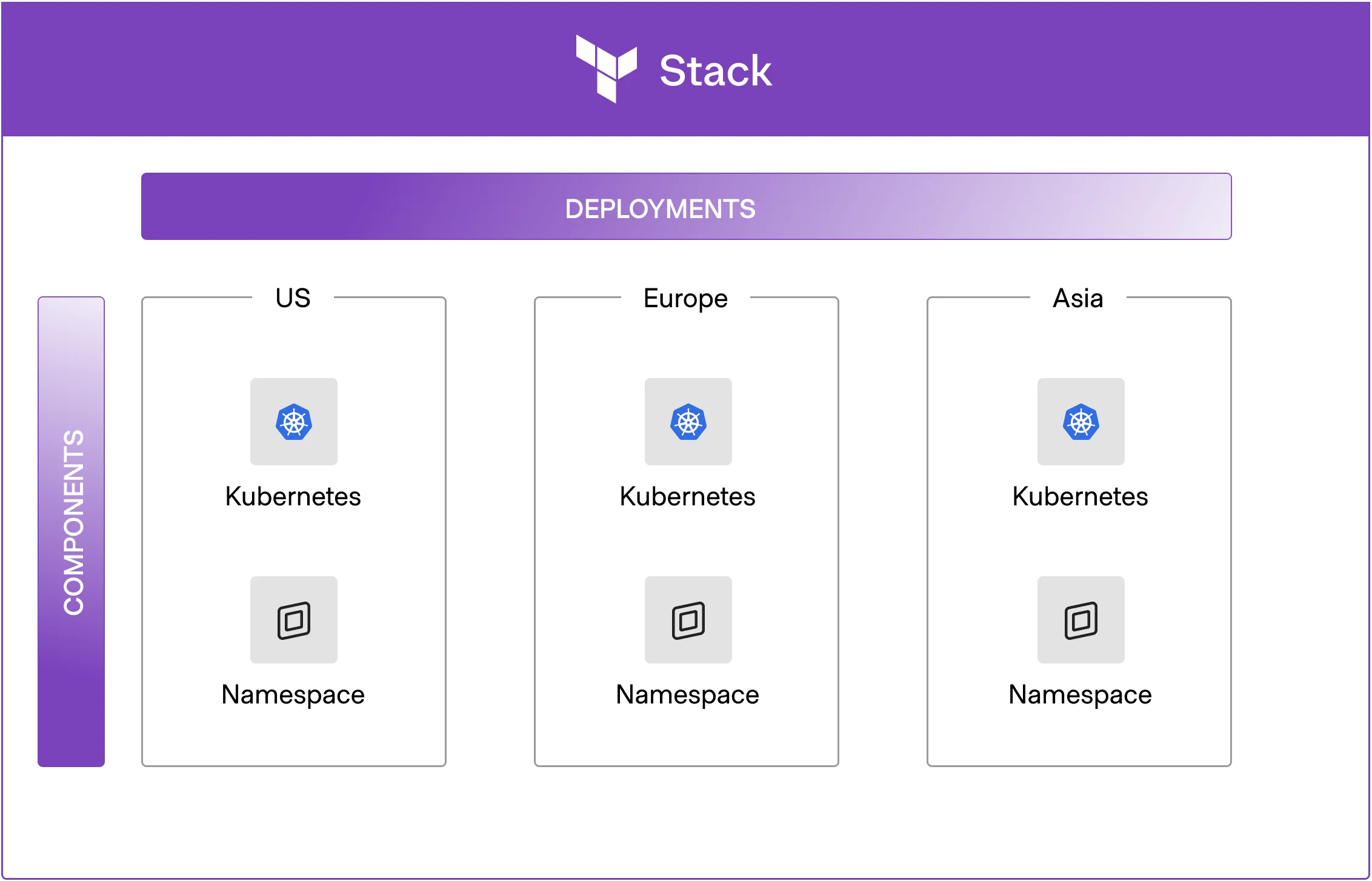
- Cross-Region Deployments: They facilitate setting up infrastructure across multiple environments—like development, staging, and production—all without requiring duplicate code. This feature is especially beneficial for large organizations managing numerous environments.
- Streamlined Kubernetes Management: Stacks vastly simplify Kubernetes deployments. Centralized control over deployments—while still maintaining the ability to scale—allows operational teams to optimize their Kubernetes management effectively.
But it’s not just about deployment; the transformative aspects of Terraform Stacks may redefine how development and operations teams interact with infrastructure. This shift could lead to more cohesive teamwork and fewer bottlenecks, which, in the long run, is essential for project success.
If you're looking to explore the myriad ways Stacks can be applied, you can check out the Terraform Stacks use cases documentation for detailed insights. It’s a treasure trove for teams ready to harness these efficiencies.
Implications and Future Outlook
Transitioning to Terraform Stacks isn’t merely an operational tweak; it signifies a potential cultural shift within tech teams. If you're working in this space, adopting Stacks could mean less friction and enhanced efficiency in both deployment and management, ultimately freeing your team to channel their creativity and energy into innovation rather than getting bogged down by configuration.
And here’s the part most people overlook: the adoption of such tools can significantly alter workflows, fostering a culture of efficiency that extends beyond just individual teams. As more organizations begin to appreciate the advantages of Terraform Stacks, we may very well see a standardization in how infrastructures are managed within various sectors.
Discussion
Sign in to join the discussion.